Appearance
Colors and threads
Every color in FlossForge is a thread you could buy, or is shown beside the closest one. The palette is the DMC range.
Current colors
The two swatches at the top of the Workbench are the primary and secondary colors. The brush and fill use the primary; text can use both. Click the active swatch to open the color editor: a picker, a hex field, a star to keep the color in your favorites, and the closest DMC thread with a button to use that thread instead. The arrow between the swatches swaps them.
Palettes
Under Palettes:
- Recent holds the colors you have used lately.
- Favorites holds the ones you have starred.
- The full DMC list follows, with a search box that takes a thread number or a name.
Click a swatch to make it the current color.
Colors in use
This section lists every color on the canvas, with how many stitches use it. For each color it shows the DMC thread it will print as; a color that is not itself a DMC color is marked with the closest thread. From here you can recolor every stitch of one color in one step, and choose the chart symbol that color prints with.
The palette generator
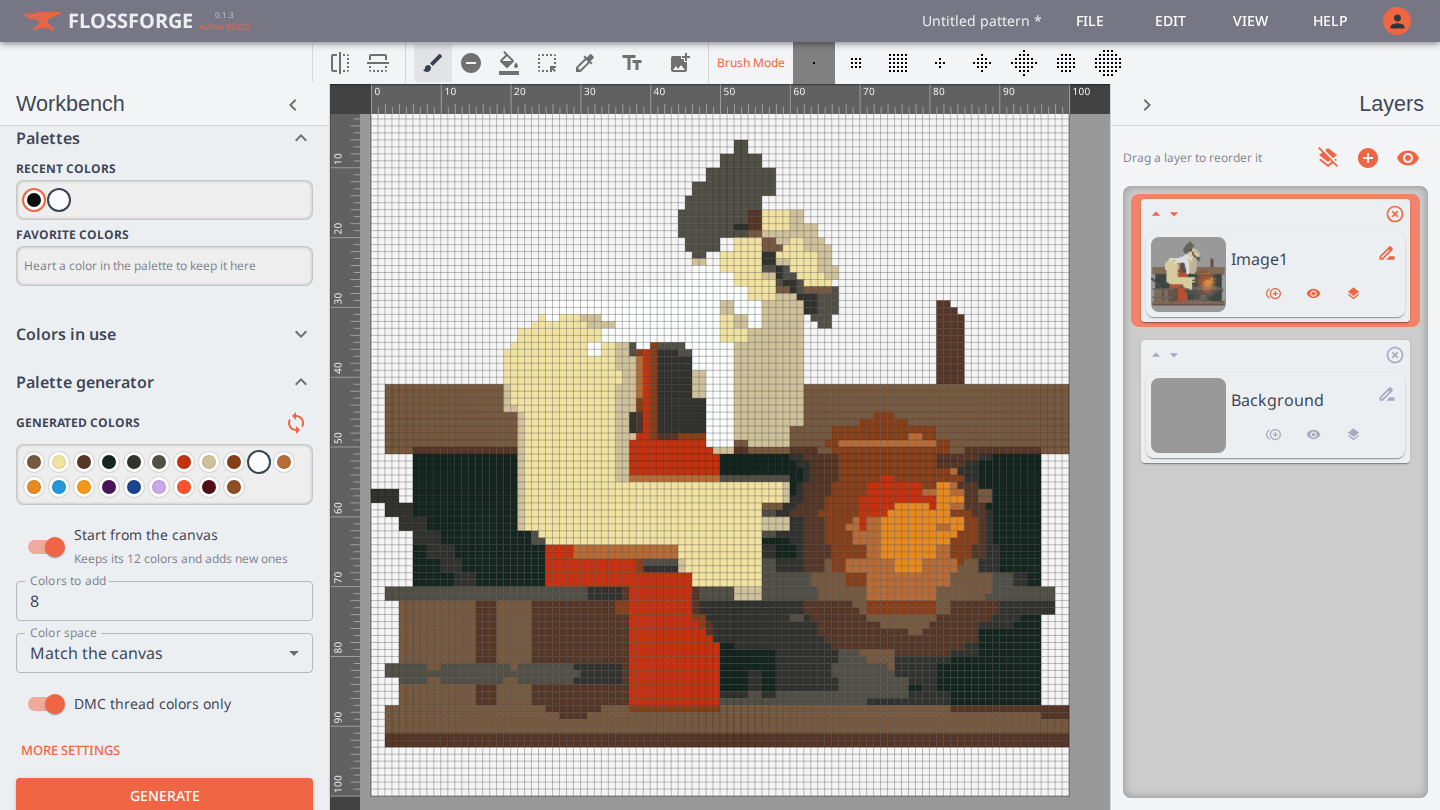
The generator builds a set of threads that sit well together. With "Start from the canvas" on, it takes the colors already in your design as given and adds colors that keep their distance from them, so a new palette fits the work you have done rather than replacing it. Set how many colors to add, choose a color space to draw from (or "Match the canvas" to stay close to the design's own range), and generate again until you like the result. Only DMC threads are offered. More settings holds the clustering method, quality, attempts and a random seed for anyone who wants to tune it.